Application burda|LIVE BIDDING
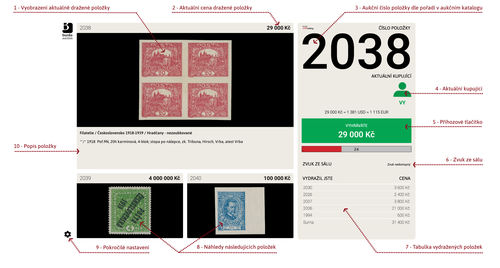
1. Image of current auction lot:
2. Lot description.
3. Lot number according to the auction catalogue.
4. ing price:
Price at the beginning of "live" auction (absentee bids included).
5. "Live Winner"
Shows the current winner: - green "ME" - I am current highest bidder
- "ROOM" - live bidder in auction room
- symbol "Globe" - internet bidder but not "ME"
- symbol "Sheet" - absentee bidder
6.Live Price:
Current price at the moment of auction.
7. Bid Button:
A button for placing "live" bids. Always shows the next amount of bid according to the bid increments.
You can also see these text:
- Wait for confirmation.
The auctioneer will confirm the winner in the room or he might be waiting for phone bids. The auction of current lot may continue. Please always wait until the next lot is displayed on the screen. - Withdrawn lot.
Lot was withdrawn during the auction. - Your Lot. You can\'t bid it.
You are the owner of the lot! Therefore you aren\'t allowed to bid. - System is bidding according to your absentee bids:
Our system automatically secure that you can´t bid against your absentee bids placed before the live part of the auction. If your absentee bid is over-bidden you will be able to bid "live" again.
It is automatically set up for 7 seconds when loading a new lot and prolongs after each new bid for 5 seconds.
9. Preview of upcoming two auction lots displayed according to the catalogue.
10. List of succesful items:
List of lots you have won.
11. Setup
Enables to setup sounds, displaying of images etc.